

Agent Observability
Scores and Feedback
Attach scores to LLM traces, spans and sessions in GGX: reviewer ratings, score configs, and end-user feedback relayed from your application with the SDK or the API.
A score is a judgment attached to a trace, to one span, or to a whole session: a reviewer’s rating, a cardholder’s thumbs-down relayed by your application, an evaluator’s verdict, or a score imported from Langfuse. Every score records who gave it, when and from where, and a changed score keeps its history.
| Source | Who writes it | Can be edited by |
|---|---|---|
| Reviewer | Someone scoring from the trace page | Its author, or an organization admin |
| API | Your application or a script | Its author, or an organization admin |
| End user | Your application, relaying its user’s feedback | Its author, or an organization admin |
| Judge | An evaluator | Nobody. An organization admin may delete it. |
| Imported | The Langfuse import | Nobody. It is someone else’s record. |
Scoring from the trace page
Section titled “Scoring from the trace page”- Choose Scores & evaluations on the trace, then Add score, to score the whole trace. To score one step instead, open that span’s Scores tab.
- Pick a score name from your project’s score configs, or type a new one.
- Enter a number, yes/no or label, and add a comment.
The trace list shows each trace’s scores and can filter on them.
Score configs
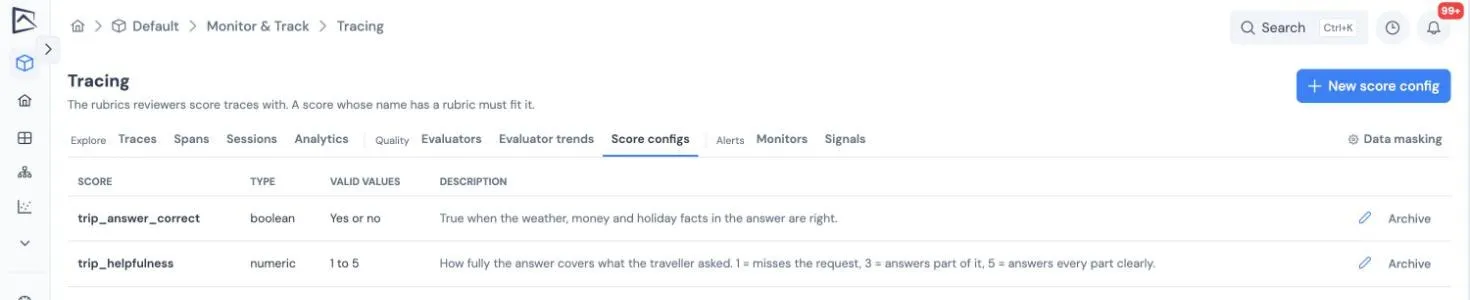
Section titled “Score configs”A score config fixes what a score name means in a project, so two reviewers’ helpfulness is the same measurement. It sets the type (number, yes/no or label), the valid range or labels, and guidance for reviewers. A score whose name has a config must fit it.
Manage them in the Score configs tab.
Relaying end-user feedback
Section titled “Relaying end-user feedback”Your application can score the exact trace a user is reacting to, straight after the call and before the trace has even finished arriving.
from genguardx import tracing
trace_id = tracing.current_trace_id()   # read it inside the call being rated...tracing.score(    trace_id, "thumbs", False,    comment="blocked the wrong card",    source="end_user",    external_id=request_id,              # a retry with the same id updates, never duplicates)
A deployment called through POST /api/v1/deployments/invoke returns traceId and projectId in its response, and an X-Trace-Id header, for the same purpose. Without the SDK, post the score to POST /api/v1/trace-scores.
What to read next
Section titled “What to read next”- Evaluators: judges that write scores for you, on live traffic.
- Monitors: alert on a score’s mean or the share of a label.
- Search, analytics and export: query traces by
score.<name>.