

Agent Observability
Evaluators
Run LLM judges on live traces in GGX: six evaluator templates, custom rubrics and labels, backfill, evaluator trends, and the spending safeguards that cap judge cost.
An evaluator is a judge that reads your traces and records a verdict on each one: a label, an optional score, and an explanation of why. Evaluators run on live traffic as it arrives, so quality is measured continuously rather than only before launch.
Templates
Section titled “Templates”| Template | Judges | Asks |
|---|---|---|
| Hallucination | Model calls | Is the answer supported by the retrieved documents? |
| User frustration | Traces | Is the user getting stuck, repeating themselves or annoyed? |
| Session coherence | Sessions | Does the conversation stay consistent and on the user’s goal? |
| Safety guardrail | Model calls | Is the output harmful, discriminatory, or a privacy or legal risk? |
| Tool-call correctness | Tool calls | Was the right tool called with sensible arguments? |
| Agent trajectory | Traces | Did the agent take a sensible path to the answer? |
Creating an evaluator
Section titled “Creating an evaluator”Open Tracing → Evaluators, choose New evaluator and start from a template or from scratch.
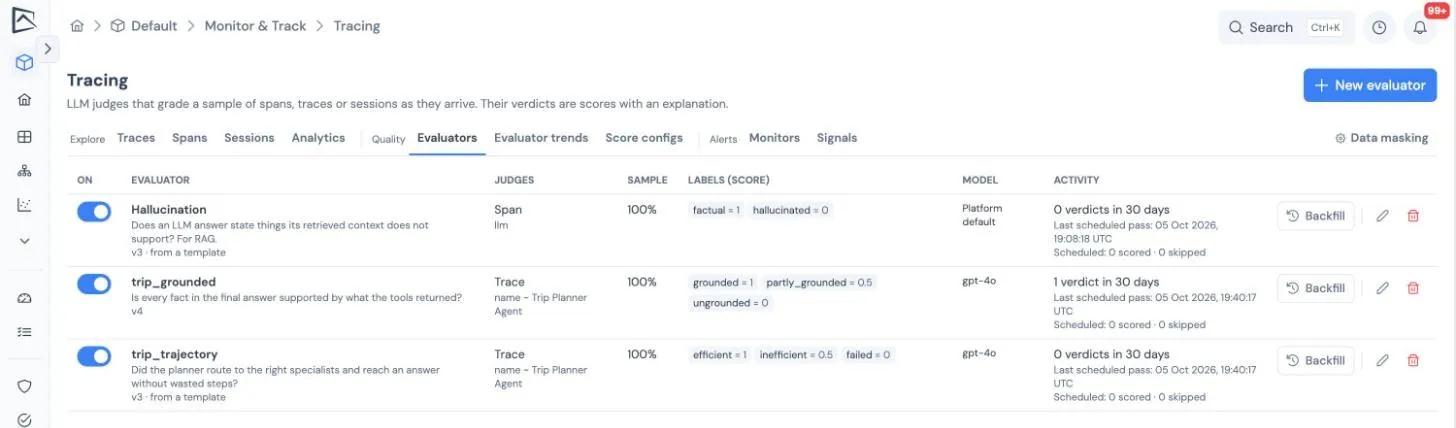
- Name and scope. The name is also the score name its verdicts are filed under. The scope is what it judges: a span, a whole trace, or a session.
- Which targets. Narrow by span kind, span name, model or environment, and set a sample percentage to judge a share of traffic. Sampling is deterministic, so the same trace is always in or out.
- Rubric. Write the judging instructions. Variables such as
{input},{output},{context},{tool_calls},{trajectory}and{conversation}insert the target’s content, which the judge reads already masked. - Labels. List the verdicts the judge may give, each with an optional score, for example
correct = 1andincorrect = 0. - Judge model. Use the platform default or any model your administrator has configured.
- Judge new traces as they arrive. Switch it on to run continuously.
A new evaluator judges traffic from the moment it is switched on. To judge history, use Backfill and choose up to 31 days; the dialog shows progress and can be canceled. Each evaluator lists when it last ran and how many targets it scored, skipped or failed.
Reading the results
Section titled “Reading the results”- The Evaluator trends tab charts each evaluator over the selected range: how many targets received each label per hour or day, and the mean score where labels carry scores.
- On a trace, a span or a session, the Evaluations list shows each verdict with its label, score, a Judge badge and the explanation. Run evaluator (under Scores & evaluations on a trace) judges that target on demand.
- Verdicts appear in the trace list’s score column and filters like any other score.
Spending safeguards
Section titled “Spending safeguards”- Daily cap. A project makes at most 5,000 judge calls per UTC day, across live judging, backfills and Run evaluator. When the cap is reached, judging pauses until midnight UTC and Run evaluator says why.
- Backoff. When every judgment in a pass fails, the next pass waits 1, 2, 4 minutes and so on, up to an hour, or as long as the model provider asks. The evaluator shows when it will try next.
- Automatic switch-off. After 30 such passes in a row the evaluator switches itself off, and its last error explains why.
- Bad answers. A judge reply that is not one of your labels is retried once and then skipped, so a misworded rubric cannot run up cost.
- Paused backfills. Switching an evaluator off pauses its backfills; they resume when it is switched back on.
- No judge configured. Nothing is sent and the evaluator says so. Judging starts from the moment a judge is configured, never from the backlog.
Trace content is passed to the judge inside randomized data fences, with the rubric in a separate system instruction, so text in a trace cannot instruct the judge or choose its verdict.
What to read next
Section titled “What to read next”- Monitors: alert on an evaluator’s mean score or the share of a label.
- Governance signals: an evaluator regression is filed as a finding.
- LLM Judges gallery: judge prompts you can adapt into a rubric.